
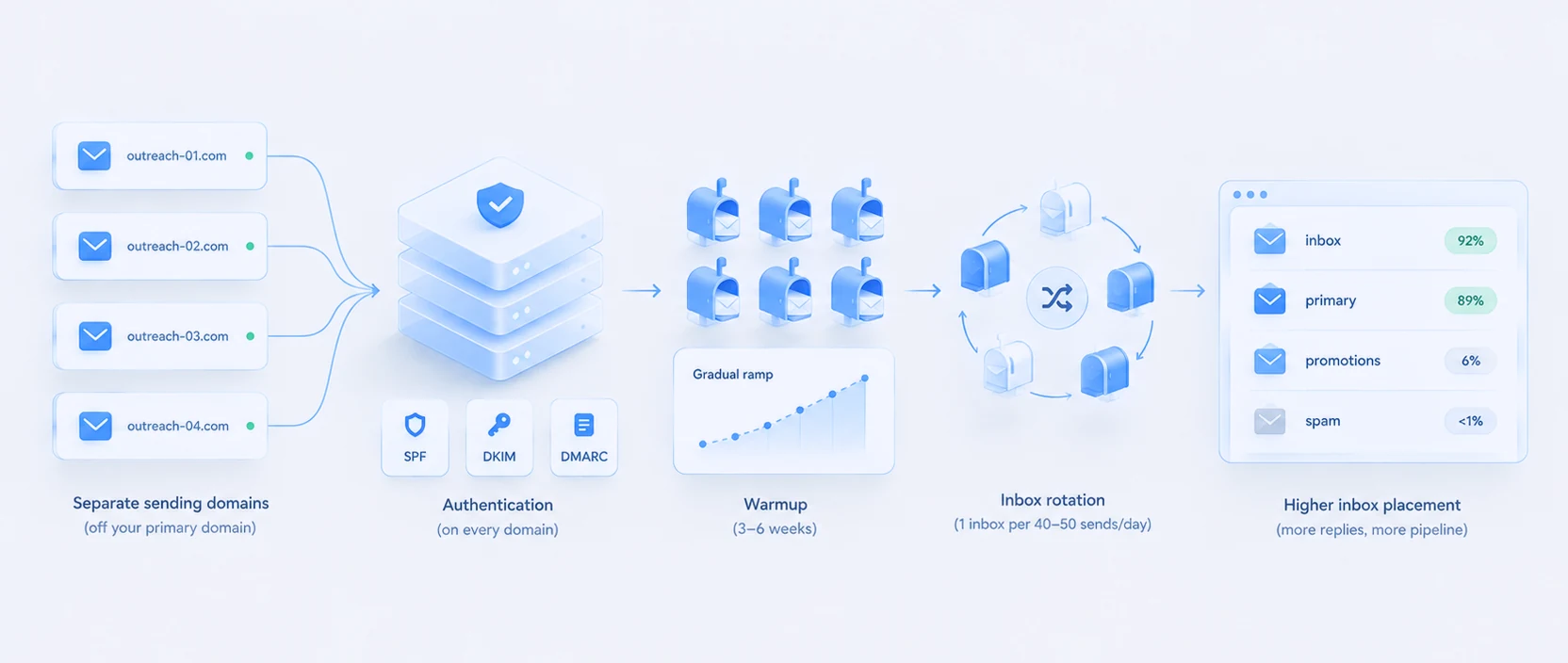
Cold email deliverability stopped being a setting and became a build. The reason is a hard change in the rules: in 2026, mail that fails authentication is not sent to the spam folder, it is rejected outright and never arrives anywhere. A weak setup used to cost you open rates. Now it costs you the entire campaign. So the infrastructure underneath your sending is no longer a detail, it is the thing that decides whether any of your outreach exists at all.
Here is what a deliverability build actually requires in 2026: the rules you have to clear, the domain and mailbox math, and the warmup timeline that most teams rush and regret.
The rules you are actually clearing
Google, Yahoo, and Microsoft, the last of them enforcing as of May 5, 2025, now hold bulk senders to hard thresholds: spam complaints under 0.3% and bounces under 2%. Cross them and you are throttled or blocked, and in 2026 the penalty for failing authentication is rejection rather than the spam folder. The provider simply refuses the mail.
Every sending domain also needs SPF, DKIM, and DMARC records, plus RFC 8058 one-click unsubscribe on marketing mail. SPF authorizes your sending provider, DKIM lets recipients verify the message was not altered, and DMARC tells receiving servers what to do with mail that fails those checks. This is not optional on secondary domains. Providers check authentication on every domain, primary or not, so skipping it on your sending domains is the same as not doing it at all.
Rule one: never send cold email from your primary domain
The most important structural decision comes before any of the above. Do not send cold email from your main company domain. Cold outreach will get marked as spam sometimes no matter how good it is, and if that happens on yourdomain.com, you damage the reputation of the domain your real business email runs on. So cold email goes out on separate sending domains, bought specifically for the job, kept apart from your brand domain. That separation is the whole point of the setup, and everything else builds on it.
The infrastructure math
Once you are on separate domains, volume dictates how many domains and mailboxes you need. The working baseline:
- One domain per 2 to 3 sending mailboxes.
- One mailbox per 40 to 50 cold emails per day.
Run the math for a real target. To send 500 cold emails a day, you need roughly 10 to 12 mailboxes spread across 4 to 6 domains. Try to push that same 500 through one or two inboxes and you blow past safe per-mailbox limits, your complaint and bounce signals spike, and the thresholds above end the program for you.
| Daily volume | Mailboxes | Domains |
|---|---|---|
| 200/day | ~4-5 | ~2-3 |
| 500/day | ~10-12 | ~4-6 |
| 1,000/day | ~20-25 | ~8-12 |
This is why deliverability at any real scale is an infrastructure problem, not a copy problem. The numbers do not bend.
Warmup: the step everyone rushes
A brand-new domain and inbox have no sending reputation, and blasting cold email from them on day one is the fastest way to get burned. The timeline that works:
- Wait about 2 weeks after registering a domain before you start warming it.
- Warm every new inbox for at least 3 weeks before it touches a live campaign.
- Start at 5 to 10 emails a day and ramp gradually over 4 to 6 weeks, keeping daily volume predictable so the reputation builds smoothly.
Add it up and a new sending domain is realistically 5 to 8 weeks from registration to safe production sending. That lead time is not overhead, it is the cost of arriving in the inbox, and it is exactly why deliverability has to be planned before a campaign, not bolted on when replies dry up.
Inbox rotation
With multiple mailboxes live, inbox rotation distributes a campaign’s volume across all of them so each stays under its safe daily limit and no single mailbox carries enough to torch its reputation. It also contains damage: if one inbox does get flagged, rotation keeps the blast radius small instead of taking the whole campaign down. Most serious sending tools handle rotation natively, which is one of the things to check when you pick one, covered in Instantly alternatives.
Where deliverability sits in the system
Deliverability is the foundation, not the whole house. A perfect inbox-placement setup still needs a sequence built to earn replies on top of it, and the intelligence of AI outbound deciding who to send to and when. But it comes first, because none of those matter if the mail is rejected at the door.
This is exactly why we treat deliverability as its own engineering track. When we turned $600 of cold email into $115,500 in pipeline, the deliverability build and the sequence were designed as one system rather than bolted together, the full breakdown is here. The result came from the infrastructure as much as the message.
The takeaway
Cold email deliverability in 2026 is a build with four parts: separate sending domains kept off your brand domain, full SPF, DKIM, and DMARC on every one of them, enough domains and mailboxes for your volume at one per 40 to 50 sends a day, and a 5 to 8 week warmup you do not skip. Clear the sub-0.3% complaint and sub-2% bounce thresholds, rotate across inboxes, and monitor it continuously, because failed authentication now means rejection, not a second chance. Building and running that system is a core piece of GTM engineering, and it is the foundation every other part of outbound sits on.
Sources:
- Authentication requirements (SPF/DKIM/DMARC + RFC 8058 one-click unsubscribe; required on every sending domain including secondaries): https://www.clay.com/blog/b2b-cold-email-deliverability and https://leadhaste.com/blog/cold-email-domain-setup-guide-2026
- Compliance thresholds (Google/Yahoo/Microsoft enforce spam complaints <0.3%, bounces <2%; Microsoft as of May 5, 2025; failed auth = rejection not spam): https://leadhaste.com/blog/spf-dkim-dmarc-cold-email and https://leadhaste.com/blog/email-deliverability-2026-changes
- Separate sending domains protect the primary domain reputation: https://www.unifygtm.com/explore/cold-email-2026-domain-setup-deliverability-sequences
- Infrastructure math (one domain per 2-3 mailboxes, one mailbox per 40-50 emails/day; 500/day = ~10-12 mailboxes across 4-6 domains): https://www.unifygtm.com/explore/cold-email-2026-domain-setup-deliverability-sequences and https://leadhaste.com/blog/cold-email-domain-setup-guide-2026
- Warmup timeline (wait ~2 weeks after registration; warm inboxes 3+ weeks; start 5-10/day, ramp over 4-6 weeks): https://instantly.ai/blog/how-to-achieve-90-cold-email-deliverability-in-2025/ and https://leadhaste.com/blog/cold-email-domain-setup-guide-2026
- Inbox rotation (distribute volume across mailboxes, protect main domain reputation): https://www.clay.com/blog/b2b-cold-email-deliverability
- Tidalstead result: internal case study (six-hundred-dollar-campaign, $600 cold email to $115,500 pipeline).